
Normal: the AI replies only to you
The AI can hear the meeting, but its reply stays on your normal Mac output. AI audio to the meeting remains OFF.
Connect a meeting app and a voice AI on macOS
Viyv Meeting Bridge is an audio router that connects meeting apps such as Zoom with voice AI clients such as ChatGPT Voice or Codex on your Mac. It is not an AI, recorder, or transcription service.
The free v1 opens after signing, notarization, and real-meeting E2E are complete.
Normally, the AI reply stays on your Mac output and is not sent to other participants.
CONCRETE EXAMPLE
Meeting Bridge does not join calls for you. You join the meeting and open a voice AI normally; the app only connects their audio on your Mac.
Join Zoom or another meeting normally, then open the voice AI you want to use.
Choose the meeting under audio for AI, and the voice AI under AI for the meeting.
Use Viyv Meeting Mic in the AI and Viyv Meeting Send in the meeting app.
Confirm the meeting audio may be shared with the AI, then start. AI audio to the meeting begins OFF.
Normally, hear the AI privately. Press Share next AI reply only when a reply should reach the meeting.
At the end, Stop closes AI audio, removes temporary routes, and restores any input Bridge changed.
The AI can hear the meeting, but its reply stays on your normal Mac output. AI audio to the meeting remains OFF.
Arm the next reply. The gate opens only when AI audio begins and closes after silence or the maximum duration.
THE ACTUAL APP
You operate the real app, not an abstract patch bay. Meeting capture and AI audio to participants are shown as separate states.
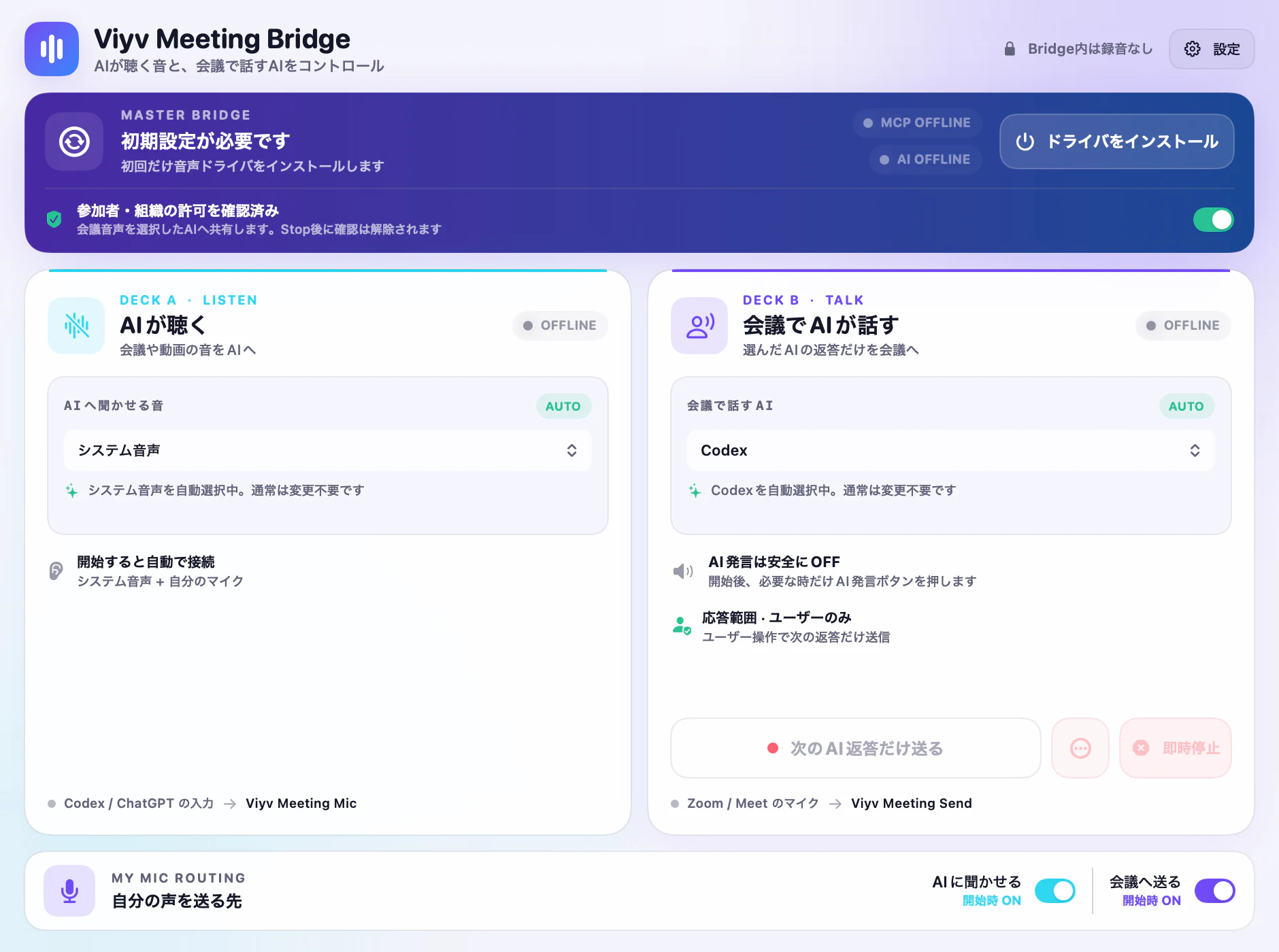
1 · LISTEN
Choose one meeting app or system audio.
2 · TALK
Limit meeting output to one selected AI app.
3 · CONSENT
Capture cannot begin until permission is confirmed.
4 · ONE SHOT
Wait for AI audio, then close after silence or the time limit.
WHAT YOU CAN DO
PRIVATE COPILOT
Let a voice AI hear the question, listen to its suggestion in headphones, and decide for yourself whether to use it.
ONE REPLY
Send one explanation, translation, or demo reply, then return to OFF automatically.
MIC CONTROL
Switch among you only, AI only, both, and all muted without rebuilding the route.
SAFE BY DEFAULT
Launching the app, capturing meeting audio, and sending AI audio to participants are three distinct states.
CONSENT REQUIRED
Neither GUI nor MCP can start meeting capture until participant and organization permission is confirmed.
AI OFF
Starting the listening route never sends an AI reply to other participants automatically.
AUTO-OFF
Bounded start wait, silence, and maximum duration keep a reply from remaining on air.
KILL
Close only the AI path while keeping your physical microphone route intact.
COMPATIBILITY STATUS
These are the current pre-release states. A combination becomes Verified only after a real-counterparty E2E passes.
| macOS 14.2 or later | Required | Uses Core Audio process taps |
|---|---|---|
| Zoom | Real-meeting E2E pending | A release gate; not currently marked supported |
| Google Meet / Chrome | Real-meeting E2E pending | Other tabs in the same browser process may be included |
| Microsoft Teams | Real-meeting E2E pending | Real send and receive validation is required |
| ChatGPT Voice / Codex | Combination testing | Input selection and reply capture must pass before release |
TWO CONTROL MODES
MCP is not required for normal use. Use the local stdio control surface only when you want agent automation.
GUI · DEFAULT
Confirm permission, start, share only the next AI reply, kill AI audio, and Stop from the window. Continuous transmission lives in an advanced menu.
LOCAL MCP · ADVANCED
Inspect state, prepare listen-only, start, speak once, kill, stop, and restore over stdio.
PRIVACY BOUNDARY
ON YOUR MAC
AI SERVICE BOUNDARY
BEFORE YOU START
DRIVER
Installs two user-space AudioServerPlugIns. No kernel extension is used.
PERMISSIONS
macOS permission is required for selected app audio and an optional physical microphone.
HEADPHONES
Speakers can let AI audio leak back through the physical microphone.
TWO INPUTS
The AI selects Viyv Meeting Mic; the meeting selects Viyv Meeting Send.
FIRST SETUP
We publish only after Developer ID signing, notarization, stapling, and fresh-Mac Gatekeeper checks.
Move the app to Applications and approve the user-space audio drivers once.
Follow the app guidance to select both sources and assign the two virtual microphones.
Start with AI audio OFF. At the end, Stop removes temporary routes and restores input settings.
This is still in pre-release validation. We do not distribute unsigned builds or Gatekeeper bypass instructions.
FAQ
No. It is an audio router between your meeting app and a separate voice AI app. It does not generate answers, transcribe, summarize, perform TTS, or perform STT.
Normally, only your physical microphone. After you arm Share next AI reply only, one AI reply is sent and the path returns to OFF after silence or the time limit.
Yes. The main GUI can share the next AI reply only. MCP is optional automation. Continuous transmission is separated into an advanced menu and requires manual stop.
No. It does not handle invitations, joining, or meeting UI. You join normally and select microphone inputs.
Bridge routing, buffering, and control stay on the Mac. The selected AI app may send audio to an external service, subject to that provider's settings and terms.
They are intended scenarios, but real-counterparty E2E is still a pre-release gate. Verified combinations will be listed at release.
Capture follows the process macOS exposes. Other tabs in the same Chrome process may be included, so a meeting-only browser context is recommended.
The download remains fail-closed until Developer ID signing, notarization, fresh-Mac Gatekeeper, driver install/update/uninstall, and real Zoom/Meet/Teams E2E all pass.
FREE v1 · PREPARING
The free v1 opens after signing, notarization, and real-meeting validation. Until then, you can review the exact operation and release gates.
No waitlist form, account signup, or unsigned DMG.